
On this page
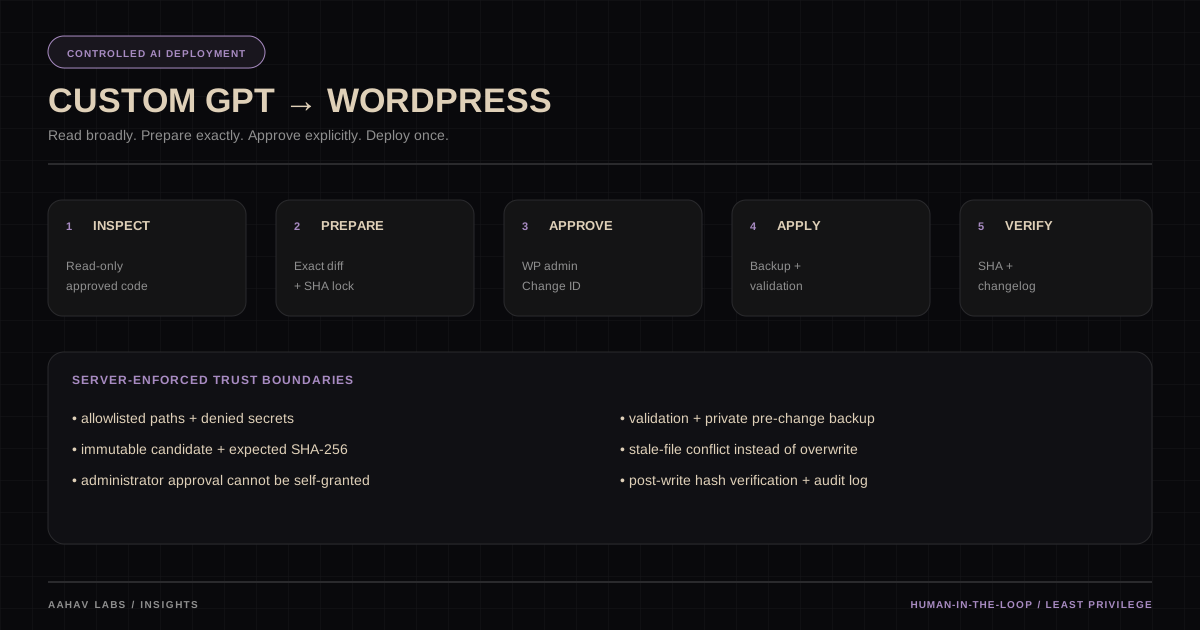
You can connect GPT Actions to WordPress and WooCommerce without granting unrestricted write access. The safer pattern is to let the model inspect approved code, prepare an immutable candidate, require a WordPress administrator to approve that exact Change ID, reject stale files with SHA-256 checks, validate and back up the target, apply the candidate atomically where possible, then verify and log the result.
1. What you are building
This tutorial shows how to connect a Custom GPT to a WordPress/WooCommerce website so that the GPT can:
- list directories;
- read source files;
- inspect plugins, themes, MU plugins, and approved WordPress drop-ins;
- analyze a problem across multiple files;
- inspect live website behavior separately through browser/web tools when available;
- calculate the SHA-256 of the exact production file it inspected;
- prepare an exact proposed code change without modifying production;
- validate PHP before deployment;
- generate a Change ID;
- wait for a human WordPress administrator to approve that Change ID;
- create a private pre-change backup;
- refuse to overwrite a file if production changed after inspection;
- apply the approved candidate atomically;
- verify the resulting SHA-256;
- append every production change to one master Markdown changelog.
The GPT should not have unrestricted FTP-style write access.
The intended model is:
PROMPT
  ↓
GPT investigates site + code
  ↓
GPT identifies ownership/root cause
  ↓
GPT PREPARES exact change
  ↓
PRODUCTION IS STILL UNCHANGED
  ↓
Human reviews exact BEFORE / AFTER
  ↓
Human approves one Change ID
  ↓
GPT applies that approved candidate only
  ↓
Backup + validation + SHA verification
  ↓
GPT re-checks production/live result
  ↓
CHANGELOG.md updated automatically
This gives you most of the productivity of “vibe coding by prompt” without allowing the model to silently rewrite production.
Product availability and publishing note — checked 1 September 2026
OpenAI's current GPT documentation is an important constraint on this tutorial:
- Custom Actions use an OpenAPI schema and support None, API key, or OAuth authentication. API-key authentication can use Basic, Bearer, or a custom header, so the
X-GPT-Site-Keypattern in this guide is compatible with the current Actions editor. - Actions are not available when using Pro mode; the editor exposes models that support Actions instead.
- OpenAI currently says personal accounts cannot create or publish new GPTs. Existing GPTs can remain usable/editable where the account still has access. Business, Enterprise, and Edu creation/sharing depend on workspace settings and permissions.
- A public GPT that uses Actions must provide a valid Privacy Policy URL. Public publishing can also require Builder Profile/domain verification.
If you already have an existing Custom GPT, this guide can still be used to harden and connect it. If you are starting from scratch, verify that your current workspace can create GPTs before implementing the bridge.
This product behavior can change. Re-check the official OpenAI documentation linked in the sources before standardizing the workflow.
2. Why this is safer than direct write access
Do not expose an API like:
writeAnyFile(path, contents)
runShellCommand(command)
deleteFile(path)
Those operations give too much authority to a language model.
Instead, split the workflow:
READ
  ↓
PREPARE
  ↓
HUMAN APPROVAL
  ↓
APPLY EXACT APPROVED CANDIDATE
The backend, not just the GPT instructions, must enforce the rule.
If the GPT attempts to apply a pending change:
403 — NOT APPROVED
If the production file changed after preparation:
409 — FILE CHANGED SINCE PREPARATION
This prevents accidental overwrites and stale edits.
3. Recommended architecture
Use one domain and one Custom GPT Action schema.
Example:
Custom GPT
    |
    | X-GPT-Site-Key
    |
    +-- READ
    |    https://example.com/gpt-file-bridge.php
    |       +-- action=list
    |       +-- action=read
    |
    +-- CONTROLLED WRITE
         https://example.com/wp-json/gpt-site-write/v1/
             +-- status
             +-- metadata
             +-- prepare
             +-- change/{id}
             +-- apply/{id}
             +-- changelog
If your GPT platform does not allow two Action definitions for the same domain, merge all paths into one OpenAPI schema as shown later in this document.
4. Files you will create
You will create three pieces:
A. WordPress plugin
   wp-content/plugins/gpt-controlled-write-bridge/

B. Root read-only bridge
   public_html/gpt-file-bridge.php

C. One merged Custom GPT OpenAPI schema
   read + controlled write
You will also add a short production-write policy to the Custom GPT instructions.
5. Recommended permissions model
Read access
Read access needs enough context for investigation, but broad read access is a confidentiality boundary. Use the narrowest practical readable scope, keep secrets outside it, and treat every readable file as data that may be disclosed to the model.
Typical readable areas:
wp-content/mu-plugins/
wp-content/plugins/
wp-content/themes/
selected root files
selected WordPress drop-ins
Sensitive files should remain unreadable:
wp-config.php
.env*
private keys
certificates
the bridge source itself
database dumps
backup archives
Controlled write access
For a development-focused WooCommerce GPT, a practical allowlist is:
wp-content/mu-plugins/
wp-content/plugins/
wp-content/themes/
wp-content/advanced-cache.php
wp-content/object-cache.php
wp-content/db.php
wp-content/sunrise.php
wp-content/db-error.php
This gives the GPT capability to edit:
- MU plugins;
- custom plugins;
- third-party plugins when genuinely necessary;
- parent/child themes;
- WooCommerce customization code;
- selected WordPress drop-ins.
Permission does not mean “edit vendor code by default.”
The GPT should still prefer:
custom plugin
MU integration
child theme
site-owned component
configuration
before directly modifying third-party plugin/theme code.
Permanently blocked write areas
Keep these blocked:
wp-config.php
.htaccess
wp-admin/
wp-includes/
wp-content/uploads/
wp-content/cache/
wp-content/upgrade/
backup directories
security logs
the bridge plugin itself
6. WordPress controlled-write plugin
Create:
wp-content/plugins/gpt-controlled-write-bridge/
gpt-controlled-write-bridge.php
Or package this folder as a ZIP and install it from:
WordPress Admin
→ Plugins
→ Add New
→ Upload Plugin
Use the following code.
<?php
/**
* Plugin Name: GPT Controlled Write Bridge
* Description: Approval-gated file editing for a Custom GPT with SHA-256 locking, private backups, PHP lint, atomic writes, and one append-only Markdown changelog.
* Version: 1.0.0
* Requires PHP: 7.4
*/
if ( ! defined( 'ABSPATH' ) ) {
exit;
}
final class GPT_Site_Write_Bridge {
const NS = 'gpt-site-write/v1';
const VERSION = '1.0.0';
const OPT_KEY = 'gpt_site_write_key_hash';
const OPT_ALLOWLIST = 'gpt_site_write_allowlist';
const OPT_CHANGES = 'gpt_site_write_changes';
const KEY_TRANSIENT = 'gpt_site_write_key_once';
public static function boot() {
$self = new self();
add_action( 'rest_api_init', array( $self, 'routes' ) );
add_action( 'admin_menu', array( $self, 'menu' ) );
add_action( 'admin_post_gpt_site_key', array( $self, 'admin_key' ) );
add_action( 'admin_post_gpt_site_allowlist', array( $self, 'admin_allowlist' ) );
add_action( 'admin_post_gpt_site_decide', array( $self, 'admin_decide' ) );
}
public static function activate() {
if ( false === get_option( self::OPT_ALLOWLIST, false ) ) {
update_option(
self::OPT_ALLOWLIST,
array(
'wp-content/mu-plugins/',
'wp-content/plugins/',
'wp-content/themes/',
'wp-content/advanced-cache.php',
'wp-content/object-cache.php',
'wp-content/db.php',
'wp-content/sunrise.php',
'wp-content/db-error.php',
),
false
);
}
if ( false === get_option( self::OPT_CHANGES, false ) ) {
update_option( self::OPT_CHANGES, array(), false );
}
self::ensure_storage();
}
private static function private_root() {
if ( defined( 'GPT_SITE_PRIVATE_DIR' ) && GPT_SITE_PRIVATE_DIR ) {
return rtrim( (string) GPT_SITE_PRIVATE_DIR, '/\\' );
}
/*
* Default: one directory above the WordPress public root.
*
* Example:
* /home/account/public_html/
* /home/account/gpt-site-private/
*/
return rtrim(
dirname( rtrim( ABSPATH, '/\\' ) ),
'/\\'
) . DIRECTORY_SEPARATOR . 'gpt-site-private';
}
private static function ensure_storage() {
$root = self::private_root();
foreach (
array(
$root,
$root . '/changes',
$root . '/backups',
$root . '/audit',
) as $directory
) {
if ( ! is_dir( $directory ) && ! wp_mkdir_p( $directory ) ) {
return new WP_Error(
'gpt_site_storage',
'Unable to create private storage: ' . $directory
);
}
}
$changelog = $root . '/audit/CHANGELOG.md';
if ( ! file_exists( $changelog ) ) {
$header = "# GPT Production Changelog\n\n";
$header .= "> Append-only production change history generated by GPT Controlled Write Bridge.\n\n";
if ( false === file_put_contents( $changelog, $header, LOCK_EX ) ) {
return new WP_Error(
'gpt_site_storage',
'Unable to create CHANGELOG.md.'
);
}
}
return true;
}
private function key_hash( $key ) {
return hash_hmac(
'sha256',
(string) $key,
wp_salt( 'auth' )
);
}
public function auth( WP_REST_Request $request ) {
$key = trim(
(string) $request->get_header( 'x-gpt-site-key' )
);
$stored = (string) get_option(
self::OPT_KEY,
''
);
if (
'' === $key
|| '' === $stored
|| ! hash_equals( $stored, $this->key_hash( $key ) )
) {
return new WP_Error(
'gpt_site_unauthorized',
'Invalid or missing API key.',
array( 'status' => 401 )
);
}
return true;
}
public function routes() {
$permission = array( $this, 'auth' );
register_rest_route(
self::NS,
'/status',
array(
'methods' => 'GET',
'callback' => array( $this, 'status' ),
'permission_callback' => $permission,
)
);
register_rest_route(
self::NS,
'/metadata',
array(
'methods' => 'GET',
'callback' => array( $this, 'metadata' ),
'permission_callback' => $permission,
)
);
register_rest_route(
self::NS,
'/prepare',
array(
'methods' => 'POST',
'callback' => array( $this, 'prepare' ),
'permission_callback' => $permission,
)
);
register_rest_route(
self::NS,
'/change/(?P<id>GPT-[A-Za-z0-9\-]+)',
array(
'methods' => 'GET',
'callback' => array( $this, 'get_change_api' ),
'permission_callback' => $permission,
)
);
register_rest_route(
self::NS,
'/apply/(?P<id>GPT-[A-Za-z0-9\-]+)',
array(
'methods' => 'POST',
'callback' => array( $this, 'apply' ),
'permission_callback' => $permission,
)
);
register_rest_route(
self::NS,
'/changelog',
array(
'methods' => 'GET',
'callback' => array( $this, 'changelog' ),
'permission_callback' => $permission,
)
);
}
private function normalize( $path ) {
$path = ltrim(
str_replace(
'\\',
'/',
trim( (string) $path )
),
'/'
);
if (
'' === $path
|| false !== strpos( $path, "\0" )
) {
return new WP_Error(
'gpt_site_path',
'Invalid path.'
);
}
foreach ( explode( '/', $path ) as $part ) {
if (
'' === $part
|| '.' === $part
|| '..' === $part
) {
return new WP_Error(
'gpt_site_path',
'Path traversal rejected.'
);
}
}
return $path;
}
private function denied( $path ) {
$path = strtolower( $path );
if (
in_array(
$path,
array(
'wp-config.php',
'.htaccess',
'wp-load.php',
'wp-settings.php',
),
true
)
) {
return true;
}
foreach (
array(
'wp-admin/',
'wp-includes/',
'wp-content/uploads/',
'wp-content/cache/',
'wp-content/upgrade/',
'wp-content/backups/',
'wp-content/ai1wm-backups/',
'wp-content/wflogs/',
'wp-content/plugins/gpt-controlled-write-bridge/',
) as $blocked_prefix
) {
if ( 0 === strpos( $path, $blocked_prefix ) ) {
return true;
}
}
return false;
}
private function target( $path ) {
$path = $this->normalize( $path );
if ( is_wp_error( $path ) ) {
return $path;
}
if ( $this->denied( $path ) ) {
return new WP_Error(
'gpt_site_denied',
'Path is permanently blocked.'
);
}
$extension = strtolower(
pathinfo( $path, PATHINFO_EXTENSION )
);
if (
! in_array(
$extension,
array( 'php', 'js', 'css', 'json' ),
true
)
) {
return new WP_Error(
'gpt_site_extension',
'File extension is not allowed.'
);
}
$allowed = false;
foreach (
(array) get_option( self::OPT_ALLOWLIST, array() )
as $rule
) {
$rule = ltrim(
str_replace(
'\\',
'/',
trim( (string) $rule )
),
'/'
);
if ( '' === $rule ) {
continue;
}
if ( '/' === substr( $rule, -1 ) ) {
if ( 0 === strpos( $path, $rule ) ) {
$allowed = true;
break;
}
} elseif ( hash_equals( $rule, $path ) ) {
$allowed = true;
break;
}
}
if ( ! $allowed ) {
return new WP_Error(
'gpt_site_allowlist',
'Path is not in the write allowlist.'
);
}
$absolute = wp_normalize_path(
ABSPATH . $path
);
$root = trailingslashit(
wp_normalize_path( ABSPATH )
);
$real = realpath( $absolute );
if (
false === $real
|| ! is_file( $real )
) {
return new WP_Error(
'gpt_site_missing',
'Target file does not exist.'
);
}
$real = wp_normalize_path( $real );
if ( 0 !== strpos( $real, $root ) ) {
return new WP_Error(
'gpt_site_path',
'Resolved file is outside the WordPress root.'
);
}
return array(
'relative' => $path,
'absolute' => $real,
'extension'=> $extension,
);
}
private function sha( $file ) {
return (string) @hash_file(
'sha256',
$file
);
}
private function changes() {
$value = get_option(
self::OPT_CHANGES,
array()
);
return is_array( $value )
? $value
: array();
}
private function get_change( $id ) {
$changes = $this->changes();
return isset( $changes[ $id ] )
? $changes[ $id ]
: null;
}
private function put_change( $id, $record ) {
$changes = $this->changes();
$changes[ $id ] = $record;
if ( count( $changes ) > 250 ) {
$changes = array_slice(
$changes,
-250,
null,
true
);
}
update_option(
self::OPT_CHANGES,
$changes,
false
);
}
private function now() {
return wp_date( DATE_ATOM );
}
private function id() {
return 'GPT-'
. wp_date( 'Ymd-His' )
. '-'
. strtoupper(
wp_generate_password(
5,
false,
false
)
);
}
private function public_record( $record ) {
unset(
$record['candidate_path'],
$record['backup_path']
);
if ( ! empty( $record['replacements'] ) ) {
foreach (
$record['replacements']
as &$replacement
) {
$replacement['old_preview'] = mb_substr(
$replacement['old'],
0,
2500
);
$replacement['new_preview'] = mb_substr(
$replacement['new'],
0,
2500
);
unset(
$replacement['old'],
$replacement['new']
);
}
unset( $replacement );
}
return $record;
}
public function status() {
$storage = self::ensure_storage();
return array(
'ok' => ! is_wp_error( $storage ),
'version' => self::VERSION,
'storage_ready' => ! is_wp_error( $storage ),
'private_root' => self::private_root(),
'allowlist' => array_values(
(array) get_option(
self::OPT_ALLOWLIST,
array()
)
),
'approval' => 'Every production write requires WordPress administrator approval.',
);
}
public function metadata( WP_REST_Request $request ) {
$target = $this->target(
$request->get_param( 'path' )
);
if ( is_wp_error( $target ) ) {
return $target;
}
return array(
'path' => $target['relative'],
'sha256' => $this->sha(
$target['absolute']
),
'size' => (int) filesize(
$target['absolute']
),
'writable' => is_writable(
$target['absolute']
),
'modified' => wp_date(
DATE_ATOM,
(int) filemtime(
$target['absolute']
)
),
);
}
private function php_lint( $file ) {
$disabled = array_map(
'trim',
explode(
',',
(string) ini_get(
'disable_functions'
)
)
);
if (
! function_exists( 'exec' )
|| in_array( 'exec', $disabled, true )
) {
return array(
'status' => 'FAIL',
'message' => 'PHP CLI lint is unavailable because exec() is disabled.',
);
}
$binaries = array();
if (
defined( 'GPT_SITE_PHP_BINARY' )
&& GPT_SITE_PHP_BINARY
) {
$binaries[] = GPT_SITE_PHP_BINARY;
}
if ( defined( 'PHP_BINARY' ) ) {
$binaries[] = PHP_BINARY;
}
$binaries = array_merge(
$binaries,
array(
'/usr/bin/php',
'/usr/local/bin/php',
)
);
$binary = '';
foreach (
array_unique( $binaries )
as $candidate
) {
if (
$candidate
&& is_file( $candidate )
&& is_executable( $candidate )
&& false === stripos(
basename( $candidate ),
'fpm'
)
) {
$binary = $candidate;
break;
}
}
if ( '' === $binary ) {
return array(
'status' => 'FAIL',
'message' => 'PHP CLI binary not found. Define GPT_SITE_PHP_BINARY.',
);
}
$output = array();
$code = 1;
exec(
escapeshellarg( $binary )
. ' -l '
. escapeshellarg( $file )
. ' 2>&1',
$output,
$code
);
return array(
'status' => 0 === $code
? 'PASS'
: 'FAIL',
'message' => implode(
"\n",
$output
),
);
}
private function validate( $file, $extension ) {
if ( 'php' === $extension ) {
return $this->php_lint( $file );
}
if ( 'json' === $extension ) {
json_decode(
(string) file_get_contents( $file ),
true
);
return JSON_ERROR_NONE === json_last_error()
? array(
'status' => 'PASS',
'message' => 'JSON parsed successfully.',
)
: array(
'status' => 'FAIL',
'message' => json_last_error_msg(),
);
}
return array(
'status' => 'WARN',
'message' => 'No server-side syntax checker configured for this file type.',
);
}
public function prepare( WP_REST_Request $request ) {
$params = $request->get_json_params();
$target = $this->target(
$params['path'] ?? ''
);
if ( is_wp_error( $target ) ) {
return $target;
}
$purpose = sanitize_textarea_field(
$params['purpose'] ?? ''
);
$expected_sha = strtolower(
trim(
(string) (
$params['expected_sha256']
?? ''
)
)
);
$replacements = is_array(
$params['replacements'] ?? null
)
? $params['replacements']
: array();
if (
'' === $purpose
|| ! preg_match(
'/^[a-f0-9]{64}$/',
$expected_sha
)
|| empty( $replacements )
|| count( $replacements ) > 25
) {
return new WP_Error(
'gpt_site_input',
'Purpose, valid expected_sha256, and 1-25 replacements are required.',
array( 'status' => 400 )
);
}
$current_sha = $this->sha(
$target['absolute']
);
if (
! hash_equals(
$expected_sha,
$current_sha
)
) {
return new WP_Error(
'gpt_site_sha',
'Production file changed since inspection. Re-read it.',
array(
'status' => 409,
'current_sha256' => $current_sha,
)
);
}
$current = file_get_contents(
$target['absolute']
);
if ( false === $current ) {
return new WP_Error(
'gpt_site_read',
'Could not read target.',
array( 'status' => 500 )
);
}
$candidate = $current;
$normalized = array();
foreach (
$replacements
as $index => $replacement
) {
$old = (string) (
$replacement['old']
?? ''
);
$new = (string) (
$replacement['new']
?? ''
);
$expected_count = max(
1,
(int) (
$replacement['expected_count']
?? 1
)
);
if (
'' === $old
|| substr_count(
$candidate,
$old
) !== $expected_count
) {
return new WP_Error(
'gpt_site_replace',
'Exact replacement #'
. ( $index + 1 )
. ' occurrence count does not match. Nothing prepared.',
array( 'status' => 409 )
);
}
$candidate = str_replace(
$old,
$new,
$candidate,
$actual_count
);
if ( $actual_count !== $expected_count ) {
return new WP_Error(
'gpt_site_replace',
'Replacement failed.',
array( 'status' => 500 )
);
}
$normalized[] = array(
'old' => $old,
'new' => $new,
'expected_count' => $expected_count,
);
}
if (
hash( 'sha256', $candidate )
=== hash( 'sha256', $current )
) {
return new WP_Error(
'gpt_site_same',
'Candidate is identical to production.'
);
}
$storage = self::ensure_storage();
if ( is_wp_error( $storage ) ) {
return $storage;
}
$id = $this->id();
$directory = self::private_root()
. '/changes/'
. $id;
if ( ! wp_mkdir_p( $directory ) ) {
return new WP_Error(
'gpt_site_storage',
'Could not create private change directory.'
);
}
$candidate_path = $directory
. '/candidate.'
. $target['extension'];
if (
false === file_put_contents(
$candidate_path,
$candidate,
LOCK_EX
)
) {
return new WP_Error(
'gpt_site_storage',
'Could not save private candidate.'
);
}
$validation = $this->validate(
$candidate_path,
$target['extension']
);
if ( 'FAIL' === $validation['status'] ) {
@unlink( $candidate_path );
return new WP_Error(
'gpt_site_validation',
$validation['message'],
array( 'status' => 422 )
);
}
$record = array(
'id' => $id,
'status' => 'PENDING_APPROVAL',
'created_at' => $this->now(),
'approved_at' => null,
'applied_at' => null,
'path' => $target['relative'],
'purpose' => $purpose,
'expected_sha256' => $current_sha,
'proposed_sha256' => hash(
'sha256',
$candidate
),
'after_sha256' => null,
'validation' => $validation,
'replacements' => $normalized,
'candidate_path' => $candidate_path,
'backup_path' => null,
);
$this->put_change(
$id,
$record
);
return array(
'ok' => true,
'message' => 'Prepared only. Production is unchanged. Review and approve this Change ID in WordPress Admin.',
'change' => $this->public_record( $record ),
);
}
public function get_change_api( WP_REST_Request $request ) {
$record = $this->get_change(
sanitize_text_field(
$request['id']
)
);
if ( ! $record ) {
return new WP_Error(
'gpt_site_missing',
'Change not found.',
array( 'status' => 404 )
);
}
return array(
'ok' => true,
'change' => $this->public_record(
$record
),
);
}
private function log_change( $record ) {
$log = self::private_root()
. '/audit/CHANGELOG.md';
$entry = '## ' . $record['id'] . "\n\n";
$entry .= '**Date:** ' . $record['applied_at'] . "\n";
$entry .= "**Status:** APPLIED\n";
$entry .= "**Approved by:** WordPress administrator\n\n";
$entry .= "### Purpose\n";
$entry .= $record['purpose'] . "\n\n";
$entry .= "### File\n";
$entry .= '- `' . $record['path'] . "`\n\n";
$entry .= "### Before\n";
$entry .= 'SHA-256: `' . $record['expected_sha256'] . "`\n\n";
$entry .= "### After\n";
$entry .= 'SHA-256: `' . $record['after_sha256'] . "`\n\n";
$entry .= "### Validation\n";
$entry .= '- ' . $record['validation']['status'] . ': ';
$entry .= str_replace(
array( "\r", "\n" ),
' ',
$record['validation']['message']
);
$entry .= "\n\n";
$entry .= "### Backup\n";
$entry .= "Private pre-change backup created automatically.\n\n";
$entry .= "### Change Summary\n";
$entry .= '- '
. count( $record['replacements'] )
. " exact replacement(s).\n\n---\n\n";
return false !== file_put_contents(
$log,
$entry,
FILE_APPEND | LOCK_EX
);
}
public function apply( WP_REST_Request $request ) {
$id = sanitize_text_field(
$request['id']
);
$record = $this->get_change( $id );
if ( ! $record ) {
return new WP_Error(
'gpt_site_missing',
'Change not found.',
array( 'status' => 404 )
);
}
if ( 'APPROVED' !== $record['status'] ) {
return new WP_Error(
'gpt_site_approval',
'Change is not approved in WordPress Admin.',
array(
'status' => 403,
'current_status' => $record['status'],
)
);
}
$target = $this->target(
$record['path']
);
if ( is_wp_error( $target ) ) {
return $target;
}
$current_sha = $this->sha(
$target['absolute']
);
if (
! hash_equals(
$record['expected_sha256'],
$current_sha
)
) {
$record['status'] = 'REJECTED_HASH_MISMATCH';
$this->put_change(
$id,
$record
);
return new WP_Error(
'gpt_site_sha',
'Production changed since preparation. Nothing was written.',
array(
'status' => 409,
'current_sha256' => $current_sha,
)
);
}
if (
! is_file( $record['candidate_path'] )
|| ! hash_equals(
$record['proposed_sha256'],
$this->sha(
$record['candidate_path']
)
)
) {
return new WP_Error(
'gpt_site_candidate',
'Prepared candidate is missing or changed.',
array( 'status' => 409 )
);
}
$validation = $this->validate(
$record['candidate_path'],
$target['extension']
);
if ( 'FAIL' === $validation['status'] ) {
return new WP_Error(
'gpt_site_validation',
$validation['message'],
array( 'status' => 422 )
);
}
$backup_directory = self::private_root()
. '/backups/'
. $id;
if ( ! wp_mkdir_p( $backup_directory ) ) {
return new WP_Error(
'gpt_site_backup',
'Could not create backup directory.'
);
}
$backup = $backup_directory
. '/'
. sanitize_file_name(
basename( $record['path'] )
)
. '.before';
if (
! copy(
$target['absolute'],
$backup
)
) {
return new WP_Error(
'gpt_site_backup',
'Could not back up production file.'
);
}
$temp = dirname(
$target['absolute']
)
. '/.'
. basename(
$target['absolute']
)
. '.gpt-site.tmp';
$content = file_get_contents(
$record['candidate_path']
);
if (
false === $content
|| false === file_put_contents(
$temp,
$content,
LOCK_EX
)
) {
return new WP_Error(
'gpt_site_write',
'Could not stage atomic replacement.'
);
}
$mode = @fileperms(
$target['absolute']
);
if ( false !== $mode ) {
@chmod(
$temp,
$mode & 0777
);
}
if (
! @rename(
$temp,
$target['absolute']
)
) {
@unlink( $temp );
return new WP_Error(
'gpt_site_write',
'Atomic replacement failed.'
);
}
$after_sha = $this->sha(
$target['absolute']
);
if (
! hash_equals(
$record['proposed_sha256'],
$after_sha
)
) {
@copy(
$backup,
$target['absolute']
);
return new WP_Error(
'gpt_site_verify',
'Post-write SHA verification failed. Backup restoration was attempted.',
array( 'status' => 500 )
);
}
$record['status'] = 'APPLIED';
$record['applied_at'] = $this->now();
$record['after_sha256'] = $after_sha;
$record['backup_path'] = $backup;
$record['validation'] = $validation;
$this->put_change(
$id,
$record
);
if ( ! $this->log_change( $record ) ) {
return new WP_Error(
'gpt_site_log',
'Change applied and verified, but changelog append failed. Investigate immediately.',
array( 'status' => 500 )
);
}
return array(
'ok' => true,
'message' => 'Applied, backed up, SHA-verified, and logged.',
'change' => $this->public_record(
$record
),
);
}
public function changelog( WP_REST_Request $request ) {
$storage = self::ensure_storage();
if ( is_wp_error( $storage ) ) {
return $storage;
}
$lines = min(
1000,
max(
20,
absint(
$request->get_param( 'lines' )
?: 120
)
)
);
$file = self::private_root()
. '/audit/CHANGELOG.md';
$content = file_get_contents( $file );
if ( false === $content ) {
return new WP_Error(
'gpt_site_log',
'Could not read changelog.'
);
}
$rows = preg_split(
'/\R/',
$content
);
return array(
'ok' => true,
'content' => implode(
"\n",
array_slice(
$rows,
-$lines
)
),
);
}
public function menu() {
add_management_page(
'GPT Controlled Write',
'GPT Controlled Write',
'manage_options',
'gpt-controlled-write',
array( $this, 'page' )
);
}
public function admin_key() {
if ( ! current_user_can( 'manage_options' ) ) {
wp_die( 'Unauthorized' );
}
check_admin_referer(
'gpt_site_key'
);
$key = 'gpt_'
. wp_generate_password(
48,
false,
false
);
update_option(
self::OPT_KEY,
$this->key_hash( $key ),
false
);
set_transient(
self::KEY_TRANSIENT,
$key,
10 * MINUTE_IN_SECONDS
);
wp_safe_redirect(
admin_url(
'tools.php?page=gpt-controlled-write'
)
);
exit;
}
public function admin_allowlist() {
if ( ! current_user_can( 'manage_options' ) ) {
wp_die( 'Unauthorized' );
}
check_admin_referer(
'gpt_site_allowlist'
);
$lines = preg_split(
'/\R/',
(string) wp_unslash(
$_POST['allowlist']
?? ''
)
);
$output = array();
foreach ( $lines as $line ) {
$line = ltrim(
str_replace(
'\\',
'/',
trim( $line )
),
'/'
);
if (
$line
&& false === strpos(
$line,
'..'
)
&& ! $this->denied(
strtolower( $line )
)
) {
$output[] = $line;
}
}
update_option(
self::OPT_ALLOWLIST,
array_values(
array_unique( $output )
),
false
);
wp_safe_redirect(
admin_url(
'tools.php?page=gpt-controlled-write'
)
);
exit;
}
public function admin_decide() {
if ( ! current_user_can( 'manage_options' ) ) {
wp_die( 'Unauthorized' );
}
check_admin_referer(
'gpt_site_decide'
);
$id = sanitize_text_field(
wp_unslash(
$_POST['change_id']
?? ''
)
);
$decision = sanitize_key(
wp_unslash(
$_POST['decision']
?? ''
)
);
$record = $this->get_change( $id );
if (
$record
&& 'PENDING_APPROVAL' === $record['status']
) {
if ( 'approve' === $decision ) {
$record['status'] = 'APPROVED';
$record['approved_at'] = $this->now();
}
if ( 'reject' === $decision ) {
$record['status'] = 'REJECTED';
}
$this->put_change(
$id,
$record
);
}
wp_safe_redirect(
admin_url(
'tools.php?page=gpt-controlled-write'
)
);
exit;
}
public function page() {
if ( ! current_user_can( 'manage_options' ) ) {
return;
}
$key = get_transient( self::KEY_TRANSIENT );
$allowlist = (array) get_option(
self::OPT_ALLOWLIST,
array()
);
$changes = array_reverse(
$this->changes(),
true
);
$storage = self::ensure_storage();
?>
<div class="wrap">
<h1>GPT Controlled Write Bridge</h1>
<p>
<strong>The GPT cannot approve its own production writes.</strong>
Every prepared Change ID must be approved here by a WordPress administrator.
</p>
<p>
<strong>Private storage:</strong>
<code><?php echo esc_html( self::private_root() ); ?></code>
<br>
<strong>Status:</strong>
<?php
echo is_wp_error( $storage )
? '<span style="color:#b32d2e">ERROR: ' . esc_html( $storage->get_error_message() ) . '</span>'
: '<span style="color:#008a20">READY</span>';
?>
</p>
<?php if ( $key ) : ?>
<div class="notice notice-warning inline">
<p>
<strong>Copy this API key now. It is shown temporarily:</strong>
</p>
<p>
<code style="user-select:all"><?php echo esc_html( $key ); ?></code>
</p>
<p>
Put it only in the Custom GPT Action authentication settings.
Do not paste it into chats.
</p>
</div>
<?php endif; ?>
<h2>API Key</h2>
<form
method="post"
action="<?php echo esc_url( admin_url( 'admin-post.php' ) ); ?>"
>
<?php wp_nonce_field( 'gpt_site_key' ); ?>
<input
type="hidden"
name="action"
value="gpt_site_key"
>
<?php
submit_button(
get_option( self::OPT_KEY, '' )
? 'Rotate API Key'
: 'Generate API Key',
'secondary',
'submit',
false
);
?>
</form>
<h2>Write Allowlist</h2>
<p>
One relative file or directory per line.
Directory rules must end in <code>/</code>.
</p>
<form
method="post"
action="<?php echo esc_url( admin_url( 'admin-post.php' ) ); ?>"
style="max-width:1000px"
>
<?php wp_nonce_field( 'gpt_site_allowlist' ); ?>
<input
type="hidden"
name="action"
value="gpt_site_allowlist"
>
<textarea
class="large-text code"
rows="8"
name="allowlist"
><?php echo esc_textarea( implode( "\n", $allowlist ) ); ?></textarea>
<?php submit_button( 'Save Allowlist' ); ?>
</form>
<h2>Pending / Recent Changes</h2>
<?php if ( empty( $changes ) ) : ?>
<p>No prepared changes yet.</p>
<?php endif; ?>
<?php
foreach (
array_slice(
$changes,
0,
25,
true
)
as $id => $record
) :
?>
<div
style="
background:#fff;
border:1px solid #ccd0d4;
padding:14px;
margin:14px 0;
max-width:1100px;
"
>
<h3>
<?php
echo esc_html(
$id
. ' — '
. $record['status']
);
?>
</h3>
<p>
<strong>File:</strong>
<code><?php echo esc_html( $record['path'] ); ?></code>
<br>
<strong>Purpose:</strong>
<?php echo esc_html( $record['purpose'] ); ?>
<br>
<strong>Current SHA:</strong>
<code><?php echo esc_html( $record['expected_sha256'] ); ?></code>
<br>
<strong>Proposed SHA:</strong>
<code><?php echo esc_html( $record['proposed_sha256'] ); ?></code>
<br>
<strong>Validation:</strong>
<?php
echo esc_html(
$record['validation']['status']
. ' — '
. $record['validation']['message']
);
?>
</p>
<?php if ( 'PENDING_APPROVAL' === $record['status'] ) : ?>
<details>
<summary>
<strong>Review exact BEFORE / AFTER</strong>
</summary>
<?php
foreach (
$record['replacements']
as $index => $replacement
) :
?>
<p>
<strong>
#<?php echo (int) $index + 1; ?> BEFORE
</strong>
</p>
<pre
style="
max-height:220px;
overflow:auto;
background:#f6f7f7;
padding:8px;
"
><?php echo esc_html( $replacement['old'] ); ?></pre>
<p>
<strong>
#<?php echo (int) $index + 1; ?> AFTER
</strong>
</p>
<pre
style="
max-height:220px;
overflow:auto;
background:#f6f7f7;
padding:8px;
"
><?php echo esc_html( $replacement['new'] ); ?></pre>
<?php endforeach; ?>
</details>
<form
method="post"
action="<?php echo esc_url( admin_url( 'admin-post.php' ) ); ?>"
style="display:inline-block;margin-top:10px"
>
<?php wp_nonce_field( 'gpt_site_decide' ); ?>
<input
type="hidden"
name="action"
value="gpt_site_decide"
>
<input
type="hidden"
name="change_id"
value="<?php echo esc_attr( $id ); ?>"
>
<input
type="hidden"
name="decision"
value="approve"
>
<?php
submit_button(
'Approve',
'primary',
'submit',
false
);
?>
</form>
<form
method="post"
action="<?php echo esc_url( admin_url( 'admin-post.php' ) ); ?>"
style="display:inline-block;margin:10px 0 0 8px"
>
<?php wp_nonce_field( 'gpt_site_decide' ); ?>
<input
type="hidden"
name="action"
value="gpt_site_decide"
>
<input
type="hidden"
name="change_id"
value="<?php echo esc_attr( $id ); ?>"
>
<input
type="hidden"
name="decision"
value="reject"
>
<?php
submit_button(
'Reject',
'secondary',
'submit',
false
);
?>
</form>
<?php endif; ?>
</div>
<?php endforeach; ?>
<h2>Master Changelog</h2>
<p>
<code>
<?php
echo esc_html(
self::private_root()
. '/audit/CHANGELOG.md'
);
?>
</code>
</p>
</div>
<?php
}
}
register_activation_hook(
__FILE__,
array(
'GPT_Site_Write_Bridge',
'activate',
)
);
GPT_Site_Write_Bridge::boot();
7. Private storage configuration
The plugin tries to create:
one-level-above-public-root/
gpt-site-private/
    changes/
    backups/
    audit/
        CHANGELOG.md
If your host does not permit that default location, choose a private writable directory outside the web root and add this manually to wp-config.php:
define(
	'GPT_SITE_PRIVATE_DIR',
	'/home/YOUR_ACCOUNT/gpt-site-private'
);
Do not place backups under:
public_html/
wp-content/uploads/
The backup copies may contain PHP code, secrets embedded in application files, and internal implementation details.
8. PHP CLI validation
PHP changes should fail closed if PHP lint is unavailable.
If the plugin cannot find the PHP CLI executable automatically, ask your host:
What is the PHP CLI executable path for this hosting account?
Then add to wp-config.php:
define(
	'GPT_SITE_PHP_BINARY',
	'/usr/bin/php'
);
Use the real path supplied by your host.
Do not guess.
9. Read-only bridge
Read-access warning: The code below blocks common high-risk filenames and key extensions, but it cannot prove that an otherwise ordinary source file contains no secret. A production implementation should use a positive read allowlist, keep the GPT private or tightly workspace-scoped, and add rate limiting/logging at the edge. Do not assume “read-only” means “non-sensitive.”
Create this file in the public WordPress root:
public_html/gpt-file-bridge.php
Use this code:
<?php
/**
 * GPT Read-Only File Bridge
 *
 * Functions:
 * - list directories
 * - read file contents
 *
 * Authentication:
 * - Uses the same X-GPT-Site-Key as GPT Controlled Write Bridge.
 * - No API secret is hardcoded here.
 *
 * This script contains no write/delete/upload/rename/shell operations.
 */

define( 'GPT_READ_ROOT', __DIR__ );

header( 'Content-Type: application/json; charset=utf-8' );

function gpt_read_json_exit( $status, array $body ) {
	http_response_code( $status );
	echo json_encode(
		$body,
		JSON_UNESCAPED_SLASHES
	);
	exit;
}

function gpt_read_header( $name ) {

	$server_key = 'HTTP_'
		. strtoupper(
			str_replace(
				'-',
				'_',
				$name
			)
		);

	if (
		isset( $_SERVER[ $server_key ] )
		&& is_string( $_SERVER[ $server_key ] )
	) {
		return trim(
			$_SERVER[ $server_key ]
		);
	}

	if ( function_exists( 'getallheaders' ) ) {

		$headers = getallheaders();

		if ( is_array( $headers ) ) {

			foreach (
				$headers
				as $header_name => $header_value
			) {
				if (
					0 === strcasecmp(
						(string) $header_name,
						$name
					)
				) {
					return trim(
						(string) $header_value
					);
				}
			}
		}
	}

	return '';
}

function gpt_read_authenticate() {

	$provided_key = gpt_read_header(
		'X-GPT-Site-Key'
	);

	if ( '' === $provided_key ) {
		gpt_read_json_exit(
			401,
			array(
				'error' => 'Unauthorized',
			)
		);
	}

	$wp_load = __DIR__
		. '/wp-load.php';

	if ( ! is_file( $wp_load ) ) {
		gpt_read_json_exit(
			500,
			array(
				'error' => 'WordPress bootstrap not found.',
			)
		);
	}

	require_once $wp_load;

	if (
		! function_exists( 'get_option' )
		|| ! function_exists( 'wp_salt' )
	) {
		gpt_read_json_exit(
			500,
			array(
				'error' => 'WordPress authentication functions unavailable.',
			)
		);
	}

	$stored_hash = (string) get_option(
		'gpt_site_write_key_hash',
		''
	);

	if ( '' === $stored_hash ) {
		gpt_read_json_exit(
			503,
			array(
				'error' => 'GPT API key is not configured.',
			)
		);
	}

	$provided_hash = hash_hmac(
		'sha256',
		$provided_key,
		wp_salt( 'auth' )
	);

	if (
		! hash_equals(
			$stored_hash,
			$provided_hash
		)
	) {
		gpt_read_json_exit(
			401,
			array(
				'error' => 'Unauthorized',
			)
		);
	}
}

gpt_read_authenticate();

const GPT_READ_DENY_NAMES = array(
	'wp-config.php',
	'.env',
	'.env.local',
	'.env.production',
	'.env.staging',
	'.env.development',
	'gpt-file-bridge.php',
);

function gpt_read_is_denied_name( $filename ) {

	$filename = (string) $filename;
	$lower    = strtolower( $filename );

	foreach (
		GPT_READ_DENY_NAMES
		as $denied
	) {
		if (
			$lower === strtolower( $denied )
		) {
			return true;
		}
	}

	if (
		preg_match(
			'/^\.env(?:\.|$)/i',
			$filename
		)
	) {
		return true;
	}

	if (
		preg_match(
			'/\.(?:pem|key|p12|pfx)$/i',
			$filename
		)
	) {
		return true;
	}

	return false;
}

function gpt_read_safe_path( $user_path ) {

	$user_path = is_string( $user_path )
		? $user_path
		: '.';

	$root = realpath(
		GPT_READ_ROOT
	);

	if (
		false === $root
		|| ! is_dir( $root )
	) {
		gpt_read_json_exit(
			500,
			array(
				'error' => 'Configured read root is unavailable.',
			)
		);
	}

	$root = rtrim(
		$root,
		DIRECTORY_SEPARATOR
	);

	$target = realpath(
		GPT_READ_ROOT
		. DIRECTORY_SEPARATOR
		. ltrim(
			$user_path,
			'/\\'
		)
	);

	if ( false === $target ) {
		gpt_read_json_exit(
			400,
			array(
				'error' => 'Invalid path',
			)
		);
	}

	$inside_root = (
		$target === $root
		|| 0 === strpos(
			$target,
			$root . DIRECTORY_SEPARATOR
		)
	);

	if ( ! $inside_root ) {
		gpt_read_json_exit(
			400,
			array(
				'error' => 'Invalid path',
			)
		);
	}

	if (
		is_file( $target )
		&& gpt_read_is_denied_name(
			basename( $target )
		)
	) {
		gpt_read_json_exit(
			403,
			array(
				'error' => 'This file is denied and cannot be read.',
			)
		);
	}

	return $target;
}

$action = isset( $_GET['action'] )
	? (string) $_GET['action']
	: '';

$path = isset( $_GET['path'] )
	? (string) $_GET['path']
	: '.';

if ( 'list' === $action ) {

	$target = gpt_read_safe_path(
		$path
	);

	if ( ! is_dir( $target ) ) {
		gpt_read_json_exit(
			404,
			array(
				'error' => 'Not a directory',
			)
		);
	}

	$entries = scandir( $target );

	if ( false === $entries ) {
		gpt_read_json_exit(
			500,
			array(
				'error' => 'Could not list directory',
			)
		);
	}

	$entries = array_values(
		array_filter(
			$entries,
			static function ( $entry ) {

				if (
					'.' === $entry
					|| '..' === $entry
				) {
					return false;
				}

				return ! gpt_read_is_denied_name(
					$entry
				);
			}
		)
	);

	$max_items = 150;
	$truncated = count( $entries )
		> $max_items;

	$entries = array_slice(
		$entries,
		0,
		$max_items
	);

	$items = array();

	foreach ( $entries as $entry ) {

		$full = $target
			. DIRECTORY_SEPARATOR
			. $entry;

		$items[] = array(
			'name' => $entry,
			'type' => is_dir( $full )
				? 'dir'
				: 'file',
		);
	}

	echo json_encode(
		array(
			'path'      => $path,
			'items'     => $items,
			'truncated' => $truncated,
			'note'      => $truncated
				? 'Only the first ' . $max_items . ' entries are shown. Use a narrower path.'
				: null,
		),
		JSON_UNESCAPED_SLASHES
	);

	exit;
}

if ( 'read' === $action ) {

	$target = gpt_read_safe_path(
		$path
	);

	if ( ! is_file( $target ) ) {
		gpt_read_json_exit(
			404,
			array(
				'error' => 'Not a file',
			)
		);
	}

	$max_bytes = 300000;
	$size      = filesize( $target );

	if ( false === $size ) {
		gpt_read_json_exit(
			500,
			array(
				'error' => 'Could not determine file size',
			)
		);
	}

	$content = file_get_contents(
		$target,
		false,
		null,
		0,
		$max_bytes
	);

	if ( false === $content ) {
		gpt_read_json_exit(
			500,
			array(
				'error' => 'Could not read file',
			)
		);
	}

	echo json_encode(
		array(
			'path'      => $path,
			'size'      => (int) $size,
			'truncated' => $size > $max_bytes,
			'content'   => $content,
		),
		JSON_UNESCAPED_SLASHES
	);

	exit;
}

gpt_read_json_exit(
	400,
	array(
		'error' => 'Unknown action. Use action=list or action=read.',
	)
);
10. Generate the API key
After activating the plugin go to:
WordPress Admin
→ Tools
→ GPT Controlled Write
Confirm:
Status: READY
Click:
Generate API Key
The key will look similar to:
gpt_xxxxxxxxxxxxxxxxxxxxxxxxxxxxxxxxxxxxx
Copy it.
Do not paste it into chat.
Do not put it in the OpenAPI schema.
Do not hardcode it in the read bridge.
11. Merged Custom GPT OpenAPI schema
Replace:
YOUR-DOMAIN.com
with your real domain.
Use one Action schema for the domain.
openapi: 3.1.0

info:
  title: WordPress GPT File Bridge
  description: >
    Read-only filesystem inspection plus approval-gated production code changes
    for a WordPress/WooCommerce website.
  version: 1.0.0

servers:
  - url: https://YOUR-DOMAIN.com

paths:

  /gpt-file-bridge.php:
    get:
      operationId: browseOrReadFile
      summary: List a directory or read a file.
      parameters:

        - name: action
          in: query
          required: true
          schema:
            type: string
            enum:
              - list
              - read

        - name: path
          in: query
          required: true
          schema:
            type: string

      responses:
        "200":
          description: Read/list response
          content:
            application/json:
              schema:
                $ref: "#/components/schemas/ReadResponse"

  /wp-json/gpt-site-write/v1/status:
    get:
      operationId: gptWriteStatus
      summary: Check controlled-write bridge status.
      responses:
        "200":
          description: Status
          content:
            application/json:
              schema:
                $ref: "#/components/schemas/StatusResponse"

  /wp-json/gpt-site-write/v1/metadata:
    get:
      operationId: gptGetFileMetadata
      summary: Get SHA-256 metadata for an allowlisted production file.
      parameters:

        - name: path
          in: query
          required: true
          schema:
            type: string

      responses:
        "200":
          description: Metadata
          content:
            application/json:
              schema:
                $ref: "#/components/schemas/MetadataResponse"

  /wp-json/gpt-site-write/v1/prepare:
    post:
      operationId: gptPrepareChange
      summary: Prepare exact replacements without modifying production.
      requestBody:
        required: true
        content:
          application/json:
            schema:
              $ref: "#/components/schemas/PrepareRequest"

      responses:
        "200":
          description: Change prepared
          content:
            application/json:
              schema:
                $ref: "#/components/schemas/ChangeEnvelope"

  /wp-json/gpt-site-write/v1/change/{id}:
    get:
      operationId: gptGetChange
      summary: Get prepared change status.
      parameters:

        - name: id
          in: path
          required: true
          schema:
            type: string

      responses:
        "200":
          description: Change record
          content:
            application/json:
              schema:
                $ref: "#/components/schemas/ChangeEnvelope"

  /wp-json/gpt-site-write/v1/apply/{id}:
    post:
      operationId: gptApplyApprovedChange
      summary: Apply a change already approved in WordPress Admin.
      parameters:

        - name: id
          in: path
          required: true
          schema:
            type: string

      responses:

        "200":
          description: Applied
          content:
            application/json:
              schema:
                $ref: "#/components/schemas/ChangeEnvelope"

        "403":
          description: Not approved
          content:
            application/json:
              schema:
                $ref: "#/components/schemas/ErrorResponse"

        "409":
          description: Production/candidate changed
          content:
            application/json:
              schema:
                $ref: "#/components/schemas/ErrorResponse"

  /wp-json/gpt-site-write/v1/changelog:
    get:
      operationId: gptGetChangelog
      summary: Read recent append-only production changelog entries.

      parameters:

        - name: lines
          in: query
          required: false
          schema:
            type: integer
            minimum: 20
            maximum: 1000
            default: 120

      responses:
        "200":
          description: Changelog
          content:
            application/json:
              schema:
                $ref: "#/components/schemas/ChangelogResponse"

components:

  securitySchemes:

    gptSiteApiKey:
      type: apiKey
      in: header
      name: X-GPT-Site-Key

  schemas:

    ReadItem:
      type: object
      properties:
        name:
          type: string
        type:
          type: string

    ReadResponse:
      type: object
      properties:

        path:
          type: string

        items:
          type: array
          items:
            $ref: "#/components/schemas/ReadItem"

        content:
          type: string

        size:
          type: integer

        truncated:
          type: boolean

        note:
          type: string

    StatusResponse:
      type: object
      properties:

        ok:
          type: boolean

        version:
          type: string

        storage_ready:
          type: boolean

        private_root:
          type: string

        allowlist:
          type: array
          items:
            type: string

        approval:
          type: string

    MetadataResponse:
      type: object
      properties:

        path:
          type: string

        sha256:
          type: string

        size:
          type: integer

        writable:
          type: boolean

        modified:
          type: string

    ReplacementRequest:
      type: object
      required:
        - old
        - new

      properties:

        old:
          type: string

        new:
          type: string

        expected_count:
          type: integer
          minimum: 1
          default: 1

    PrepareRequest:
      type: object
      required:
        - path
        - purpose
        - expected_sha256
        - replacements

      properties:

        path:
          type: string

        purpose:
          type: string

        expected_sha256:
          type: string

        replacements:
          type: array
          minItems: 1
          maxItems: 25
          items:
            $ref: "#/components/schemas/ReplacementRequest"

    ValidationRecord:
      type: object
      properties:

        status:
          type: string

        message:
          type: string

    ReplacementPreview:
      type: object
      properties:

        expected_count:
          type: integer

        old_preview:
          type: string

        new_preview:
          type: string

    ChangeRecord:
      type: object
      properties:

        id:
          type: string

        status:
          type: string

        created_at:
          type: string

        approved_at:
          type:
            - string
            - "null"

        applied_at:
          type:
            - string
            - "null"

        path:
          type: string

        purpose:
          type: string

        expected_sha256:
          type: string

        proposed_sha256:
          type: string

        after_sha256:
          type:
            - string
            - "null"

        validation:
          $ref: "#/components/schemas/ValidationRecord"

        replacements:
          type: array
          items:
            $ref: "#/components/schemas/ReplacementPreview"

    ChangeEnvelope:
      type: object
      properties:

        ok:
          type: boolean

        message:
          type: string

        change:
          $ref: "#/components/schemas/ChangeRecord"

    ChangelogResponse:
      type: object
      properties:

        ok:
          type: boolean

        content:
          type: string

    ErrorData:
      type: object
      properties:

        status:
          type: integer

        current_status:
          type: string

        current_sha256:
          type: string

    ErrorResponse:
      type: object
      properties:

        code:
          type: string

        message:
          type: string

        data:
          $ref: "#/components/schemas/ErrorData"

security:
  - gptSiteApiKey: []
12. Configure Custom GPT Action authentication
In the Custom GPT editor:
Actions
→ your domain Action
Use:
Authentication:
API Key
Authentication style:
Custom header
Header:
X-GPT-Site-Key
Secret:
the key generated by
WordPress Admin → Tools → GPT Controlled Write
Do not put the API key in the OpenAPI YAML itself.
13. Custom GPT production-write instructions
Add this policy to the Custom GPT's instructions:
PRODUCTION WRITE POLICY

Keep the read bridge as the primary source for filesystem inspection.

Reading, searching, inspecting, comparing, hashing, and preparing proposed
changes may happen without additional approval.

Never modify production during auditing, debugging, research, or planning.

Before every production write:

1. Read the latest target file.
2. Read all relevant surrounding code and competing owners.
3. Inspect the affected live page/DOM/runtime when relevant.
4. Determine the actual structure/CSS/JS/data/configuration owner.
5. Get the current SHA-256 with gptGetFileMetadata.
6. Call gptPrepareChange only.
7. Preparation must not modify production.
8. Show the user:
   - Change ID
   - exact file
   - root cause
   - exact proposed change
   - what remains untouched
   - validation result
   - regression risk
   - backup/rollback status
9. Tell the user to review the exact BEFORE/AFTER in
   WordPress Admin → Tools → GPT Controlled Write.
10. Do not call gptApplyApprovedChange until the user confirms that exact
    Change ID was approved.
11. If the proposal changes materially, create a new Change ID.
12. Respect all server-side approval, allowlist, SHA, validation, and backup failures.
13. After deployment, re-read the production file and verify live behavior when relevant.
14. Every successful production change must remain recorded in the single
    append-only CHANGELOG.md maintained by the bridge.

Never expose the API key.
Never bypass human approval.
Never bypass SHA checks.
Never bypass validation.
Never bypass backups.
Never bypass changelog logging.
14. First connection tests
Before any write test, ask the GPT:
List the WordPress root directory.
Do not modify anything.
Expected:
read bridge works
directory list returned
Then:
Check the controlled write bridge status.
Do not modify anything.
Expected:
storage_ready: true
approval required
write allowlist returned
Then:
Get metadata for an existing theme or plugin PHP file.
Do not prepare or apply any change.
Expected:
path
SHA-256
size
modified
writable
15. Safe end-to-end write test
Create manually:
wp-content/mu-plugins/gpt-bridge-test.php
with:
<?php

if ( ! defined( 'ABSPATH' ) ) {
	exit;
}

define( 'GPT_BRIDGE_TEST', 'v1' );
Then ask the GPT:
Read wp-content/mu-plugins/gpt-bridge-test.php,
get its metadata, and prepare changing GPT_BRIDGE_TEST from v1 to v2.
Do not apply anything.
Expected:
Change ID: GPT-...
Status: PENDING_APPROVAL
PHP validation: PASS
Production remains v1
16. Verify approval cannot be bypassed
Before approving, say:
Apply GPT-CHANGE-ID now.
Expected:
403
PENDING_APPROVAL
cannot apply
production unchanged
This is the most important security test.
If the file changes before approval, stop using the bridge immediately.
17. Human approval
WordPress security detail: The admin approval forms use both
manage_optionscapability checks and WordPress nonces. That combination matters: WordPress explicitly documents nonces as CSRF protection, not authentication or authorization. Do not remove the capability check.
In WordPress Admin:
Tools
→ GPT Controlled Write
Find the exact Change ID.
Review:
target file
purpose
current SHA
proposed SHA
validation
BEFORE
AFTER
Click:
Approve
Then return to the GPT:
I approved GPT-CHANGE-ID. Apply it.
The backend should:
check APPROVED status
        ↓
recheck current production SHA
        ↓
revalidate candidate
        ↓
create private backup
        ↓
atomically replace target
        ↓
verify resulting SHA
        ↓
append CHANGELOG.md
18. Why SHA locking matters
Imagine:
10:00 GPT reads plugin.php
10:05 GPT prepares a change
10:07 developer deploys a different version
10:10 GPT attempts apply
Without concurrency protection, the GPT may overwrite the developer's newer work.
With SHA locking:
prepared SHA != current SHA
the backend responds:
409 FILE CHANGED
The GPT must then:
re-read
→ re-investigate
→ prepare a new Change ID
→ obtain new approval
Never remove this safeguard for convenience.
19. Master CHANGELOG.md
The backend automatically maintains:
gpt-site-private/
audit/
CHANGELOG.md
Example:
## GPT-20260901-120000-ABCDE

**Date:** 2026-09-01T12:05:00+00:00
**Status:** APPLIED
**Approved by:** WordPress administrator

### Purpose
Correct mobile variation-swatch rendering.

### File
- `wp-content/mu-plugins/store-product-grid.php`

### Before
SHA-256: `...`

### After
SHA-256: `...`

### Validation
- PASS: No syntax errors detected

### Backup
Private pre-change backup created automatically.

### Change Summary
- 1 exact replacement.

---
The GPT can later answer:
What production changes were made this month?
Show the latest 10 GPT deployments.
Which plugin files did the GPT edit?
by reading this changelog.
20. Using it for WooCommerce work
A WooCommerce-aware GPT should not blindly modify whatever file contains a matching string.
For commerce changes, require the GPT to trace:
PHP/template owner
→ rendered HTML
→ live DOM
→ JavaScript state
→ WooCommerce events
→ AJAX/data
→ server validation
→ visible result
For variable products preserve:
variation attributes
variation_id
found_variation
show_variation
hide_variation
reset_data
stock/purchasability
quantity
Add to Cart validation
server-side validation
Do not derive stock only from visual swatches.
For variation-related changes test:
simple product
variable product
default variation
incomplete selection
complete selection
in stock
out of stock
disabled combination
Quick View
Quick Shop
mobile
desktop
logged in
logged out
Add to Cart
21. “Vibe coding by prompt” workflow
Once the system is installed, you can use prompts such as:
Audit why the mobile product drawer is visually broken.
Read all relevant theme/plugin/MU-plugin files and inspect the live DOM.
Do not modify anything yet.
Then:
Prepare the smallest safe fix.
Do not apply it.
The GPT should produce a Change ID.
You review it.
Then:
I approved GPT-CHANGE-ID. Apply it and verify the live page.
For plugin work:
Read the complete current plugin and all related integration code.
Find why archive pages are generating repeated AJAX.
Preserve UI/UX.
Prepare a minimal optimization patch only.
For CSS:
Inspect the live element, computed ownership, theme CSS, custom CSS,
responsive rules, and component code before preparing a fix.
For WooCommerce:
Trace the real variation form and WooCommerce events before changing
the custom swatch or Add to Cart implementation.
The key idea is:
prompt
→ research
→ ownership
→ plan
→ prepare
→ human approval
→ deploy
→ verify
not:
prompt
→ immediately rewrite production
22. Recommended Custom GPT engineering behavior
For best results, instruct the GPT to:
Never jump directly from symptom to fix.

For every technical task:

1. Establish current deployment state.
2. Identify the live component/page/viewport.
3. Inspect the live DOM/runtime when available.
4. Identify structure, CSS, JS state, AJAX/data, responsive, and accessibility owners.
5. Read all relevant PHP/JS/CSS/config around those owners.
6. Search competing, legacy, duplicate, and global owners.
7. Cross-check source against live DOM/state.
8. Determine root cause.
9. Design the smallest safe fix.
10. Define regression tests.
11. Prepare the change only.
12. Wait for explicit approval before production apply.
For heavily customized stores, add:
Do not assume the active theme or WooCommerce is the true owner merely
because the component looks native. Verify the actual implementation.
23. Vendor-code policy
Giving the GPT write access to:
wp-content/plugins/
wp-content/themes/
is useful because it allows complete engineering capability.
But instructions should still say:
Do not modify vendor files by default.
Prefer:
site-owned custom plugin
MU integration
child theme
configuration
Direct vendor modification should be deliberate and documented because vendor updates may overwrite it.
24. Performance work
The GPT should separate performance into:
PHP/server
database
object cache
page cache
DOM
CSS
JavaScript
AJAX
third-party scripts
images
video
fonts
layout/paint
duplicate initialization
Caching plugins cannot fix:
unnecessary AJAX
duplicate MutationObservers
repeated initialization
bad state ownership
large hidden DOM
duplicate plugins
polling
stale-response races
The bridge gives the GPT code access, but the model still needs to investigate architecture before changing code.
25. Security rules
Threat model: treat inspected code as untrusted model input
A read-only bridge reduces destructive capability, but it does not make retrieved content trustworthy. Source files, comments, documentation, or remotely fetched pages can contain instructions that attempt to steer a model. OWASP classifies this as direct or indirect prompt injection and recommends least privilege, separation of untrusted content, human approval for privileged actions, and adversarial testing.
For this architecture, that means:
- never let instructions found inside a file override the production-write policy;
- treat file contents as data to analyze, not authority;
- keep the API key out of all readable files;
- do not expose this shared-key bridge through a broadly shared/public GPT;
- add rate limiting, request logging, and WAF/reverse-proxy controls where possible;
- keep the WordPress administrator approval screen as the authoritative deployment gate.
A model-side confirmation prompt is useful UX. It is not a substitute for server-side authorization.
Do not expose:
shell command API
generic delete API
generic unrestricted write API
database-query API
wp-config.php
private keys
environment files
database dumps
backup archives
Use HTTPS.
Use a long random API key.
Rotate it if exposed.
Do not paste it into chat.
Do not include it in GPT instructions.
Do not include it in source code.
Keep backups outside the public root.
26. Current limitations of the basic version
Important limitations to understand before production use
The reference implementation is intentionally small and should not be mistaken for a complete deployment platform.
- Readable source can still contain secrets. Blocking
wp-config.php,.env*, and key files does not detect credentials embedded inside ordinary PHP, JSON, JavaScript, Markdown, logs, or vendor files. For production, prefer a positive read allowlist or a broker that exposes only approved code trees. - The read bridge boots WordPress for authentication on every request. That is simple and portable, but it adds application overhead. Rate-limit it and avoid exposing it to high-volume traffic.
- PHP lint is not semantic testing.
php -lcan reject syntax errors, but it cannot prove hooks, queries, checkout behavior, frontend JavaScript, CSS, or plugin compatibility are correct. - JavaScript and CSS receive only a warning in this basic validator. Add project-specific lint/build/test steps before production deployment.
- There is a narrow time-of-check/time-of-use race window. The code checks the production SHA and later replaces the file. Another process could theoretically modify the target between those operations. MITRE documents this general class as CWE-367 (TOCTOU). For higher-assurance systems, add explicit locking or deploy through a staging/release mechanism that serializes writes.
- One WordPress option stores recent change records. This is convenient for a small bridge, not an enterprise job queue or immutable audit database.
- Direct filesystem writes depend on hosting ownership and permissions. Managed hosts may require a different deployment mechanism.
For a revenue-critical WooCommerce store, use the bridge as an approval/orchestration layer around a staging-first release process, not as the only release-control system.
The basic implementation intentionally supports:
read existing file
prepare exact replacements
approve
apply
backup
verify
log
It does not automatically expose:
new-file creation
delete
rename
chmod
arbitrary shell
database writes
automatic rollback
These can be added later with the same approval model.
A safe future create-file flow would be:
prepareCreateFile
→ validate candidate
→ human approve
→ createApprovedFile
→ verify
→ changelog
A safe rollback flow would be:
prepareRollback(change_id)
→ show exact restore target
→ human approve rollback ID
→ applyApprovedRollback
→ verify
→ append changelog
27. Recommended staging architecture
For larger or revenue-critical stores, the ideal evolution is:
GPT investigates production
        ↓
GPT prepares change
        ↓
apply to staging
        ↓
automated/lifecycle checks
        ↓
human review
        ↓
approve production
        ↓
production SHA lock
        ↓
deploy
This is safer than using production as the first execution environment.
28. Troubleshooting
The GPT says the same domain already exists on another Action
Use one merged Action schema per domain.
Do not create separate read and write Actions if the product prevents duplicate domains.
Read bridge returns Unauthorized
Confirm Custom GPT Action authentication is:
API Key
Custom header
X-GPT-Site-Key
Confirm the API key is the current one generated by:
Tools → GPT Controlled Write
Write bridge status works but read bridge fails
Confirm the final:
public_html/gpt-file-bridge.php
uses:
X-GPT-Site-Key
and checks the WordPress option:
gpt_site_write_key_hash
Storage status fails
Configure:
define(
	'GPT_SITE_PRIVATE_DIR',
	'/real/private/path'
);
outside the web root.
PHP validation fails because CLI is unavailable
Configure:
define(
	'GPT_SITE_PHP_BINARY',
	'/real/php/cli/path'
);
using the hosting provider's actual PHP CLI path.
Prepare returns replacement count mismatch
The GPT's old-text anchor was ambiguous or stale.
Correct process:
re-read current file
→ use a more precise exact block
→ prepare again
Do not weaken the exact-match requirement.
Apply returns 409
Production changed since preparation.
Correct process:
re-read
→ re-investigate
→ new SHA
→ new candidate
→ new Change ID
→ new approval
Action schema validator says object schema missing properties
Use explicit schemas under:
components:
  schemas:
as shown in the merged schema above.
29. Final operating checklist
Before relying on the bridge:
[ ] WordPress plugin installed
[ ] Tools → GPT Controlled Write shows READY
[ ] private storage is outside public web root
[ ] write allowlist reviewed
[ ] API key generated
[ ] read bridge uploaded
[ ] one merged Action schema configured
[ ] authentication uses X-GPT-Site-Key
[ ] production-write policy added to GPT instructions
[ ] root read test PASS
[ ] write status test PASS
[ ] metadata test PASS
[ ] prepare-only test PASS
[ ] production unchanged after prepare
[ ] apply before approval BLOCKED
[ ] human approval PASS
[ ] apply after approval PASS
[ ] PHP lint PASS
[ ] private backup created
[ ] resulting SHA verified
[ ] production re-read PASS
[ ] CHANGELOG.md entry PASS
30. FAQs
How do I connect a Custom GPT to WordPress?
Expose a narrowly scoped HTTPS API from WordPress, describe its operations in an OpenAPI schema, and configure the GPT Action to authenticate to that API. For this tutorial, the Action can list/read approved files and can prepare or apply an approval-gated change through separate endpoints.
Can a Custom GPT safely edit WordPress or WooCommerce files?
It can be made safer, but no AI-connected production write path is risk-free. The important controls are server-side least privilege, immutable prepared candidates, explicit WordPress-administrator approval, SHA-256 stale-file checks, validation, private backups, atomic replacement where supported, post-write verification, and audit logging.
Why use SHA-256 before applying a GPT-generated change?
The hash binds the prepared candidate to the exact production file that was inspected. If another deployment or administrator changes that file before apply, the bridge returns a conflict instead of silently overwriting newer work.
Should I share a GPT that has WordPress filesystem access?
Not with a shared static API key. Anyone who can invoke the Action may be able to exercise whatever read scope that key permits. Keep this pattern private/workspace-restricted, or redesign authentication and authorization for per-user identities and tenant-specific permissions before broader sharing.
Does GPT Actions support a custom API-key header?
Yes. OpenAI's current Actions documentation says API-key authentication can be configured as Basic, Bearer, or Custom header. That supports the X-GPT-Site-Key approach used in this guide.
Do public GPTs with Actions need a privacy policy?
Yes under OpenAI's current publishing guidance. Public GPTs using Actions must include a valid Privacy Policy URL, and public publishing can also depend on workspace eligibility and Builder Profile/domain requirements.
Is a WordPress nonce enough to authorize an AI deployment?
No. WordPress documents nonces as protection against request forgery, not as authentication, authorization, or access control. Keep a capability check such as current_user_can( 'manage_options' ) in the administrator approval path.
What is the biggest remaining risk in this basic reference implementation?
The largest architectural risks are overly broad read exposure, indirect prompt injection through inspected content, insufficient semantic testing, and the narrow file-state race between the last SHA check and filesystem replacement. A staging-first deployment model with explicit locking, automated tests, and least-privilege read scopes is stronger for critical stores.
Primary sources checked
- OpenAI Help Center — Configuring actions in GPTs
- OpenAI Help Center — Creating and editing GPTs
- OpenAI Help Center — Sharing and publishing GPTs
- OpenAI Help Center — Verifying your domain for OpenAI identity
- WordPress REST API Handbook — Authentication
- WordPress REST API Handbook — Adding Custom Endpoints
- WordPress Developer Resources — Nonces
- OWASP GenAI Security Project — LLM01:2025 Prompt Injection
- OWASP GenAI Security Project — LLM06:2025 Excessive Agency
- MITRE CWE-367 — Time-of-check Time-of-use Race Condition
Last fact-checked: 1 September 2026. Product UI, plan eligibility, and GPT publishing rules can change; verify the current OpenAI documentation before deployment.
31. How Aahav Labs would productionize this
This reference pattern is useful when you want AI-assisted WordPress or WooCommerce development without turning a model into an unrestricted production file manager. A production implementation should be adapted to the store's hosting model, plugin ownership, release process, security posture, and rollback requirements.
Aahav Labs can help with WooCommerce development, AI automation, security-aware implementation, and web engineering. For related architecture decisions, see the headless WooCommerce architecture guide and the AI coding workflow guide.
32. The central principle
A safe prompt-driven coding system should behave like this:
AI has broad visibility
        +
AI can prepare exact code
        +
AI cannot silently deploy
        +
Human approves one immutable candidate
        +
Server enforces hash/validation/backup rules
        +
Every production change is auditable
That gives you a practical “vibe-code by prompt” workflow for WordPress and WooCommerce without turning the language model into an unrestricted production file manager.
Research first.
Prepare second.
Approve explicitly.
Deploy exactly.
Verify afterward.
Log everything.